Authorization Boundary Diagram
How to create an Authorization Boundary Diagram for DOW deployments, including data flow requirements and boundary examples.
An Authorization Boundary Diagram (ABD) is a visual representation of your system's software components, data flows, and security boundaries. It shows how data moves between internal and external systems and identifies the ports and protocols for each connection, and where components locate within the Game Warden environment, ensuring your system connects securely with the platform and satisfies all deployment and security requirements.
As the most critical visual component of the Body of Evidence (BoE), the ABD functions as the legal map of the system. It defines precisely what the Authorizing Official (AO) is accepting responsibility for when signing the Software Approval.
Understanding data flow and external connections
Your ABD must show how data moves into and out of your system. This enables the Game Warden team to verify your integration and security requirements for deployment.
Include the following three types of data flow in your diagram:
- Ingress – When data enters your system (for example, user input or file uploads).
- Egress – When data exits your system (for example, sending logs or API responses).
- Bidirectional – When data flows both ways (for example, interactions with third-party APIs).
Marking these flows makes it easier for the team to assess how your system interacts with other services. See External Data Connections Overview for security considerations and best practices.
Authorization Boundary Diagram requirements
When creating your ABD, show how data moves both within and beyond your application's boundary. Specifically:
- Specify the direction of data flow: ingress, egress, or bidirectional.
- Specify the ports and protocols used for each connection.
- Include all containers, external systems, and managed services.
This level of detail supports security, compliance, and connectivity evaluations.
What to include in your diagram
Include the following details:
-
Ports and Protocols in Use - Specify the ports and protocols for each connection (for example, HTTPS over TCP/443). This enables the Game Warden team to understand your system's exposure and verify alignment with security best practices.
-
Ingress and Egress Flows - Specify which data flows are inbound, outbound, or bidirectional.This enables the Game Warden team to understand how external systems interact with your application.
-
External Services or Systems - Identify any services outside of Game Warden (for example, customer APIs, logging services) and show how your application connects to them.
-
Data Movement Constraints - To avoid unintentional data movement across environments—often called data spillage—be sure to:
- Prevent IL4+ data from being transferred to lower IL environments such as IL2.
- Show government-approved services (such as the Cloud Native Access Point (CNAP), Boundary Cloud Access Point (BCAP) or proxy gateways) when required by policy.
Open the ABD template in Excalidraw by selecting Open or dragging the file into the editor. Export the completed ABD as a high-resolution PNG, regardless of certification path, so reviewers can read all text, including IP addresses, ports, and protocols, when zooming in. Select Export image, choose PNG, and set the scale to the largest available option.
Boundary examples
The following diagrams illustrate how external users access the Game Warden environment. On the right side of each diagram, you'll see two types of users:
- One accessing through the Department of War (DOW)'s Non-classified Internet Protocol Router Network (NIPRNet)
- Another accessing via the public internet
IL4 and IL5 use a CNAP/BCAP to control access, while IL2 does not. This is the primary distinction between IL2 and higher Impact Level environments. The CNAP/BCAP screens NIPRNet users against an IP allowlist and permits access only from approved DoD IP addresses.
Once screened, both NIPRNet and public internet users route through an Internet Gateway to reach the Game Warden Authorization Boundary. From there, they can access AWS services and application containers.
Keycloak authenticates all customer environments. For applications hosted on Platform One (P1), users must log in with P1 credentials. CNAP/BCAP also acts as a gatekeeper for P1 access at IL4 and IL5.
As shown in the diagrams, external access to the system may involve the following paths:
- NIPRNet
- Public Internet
- P1
- AWS GovCloud
The diagram below displays the external data connections, customer containers, and the required platform services.
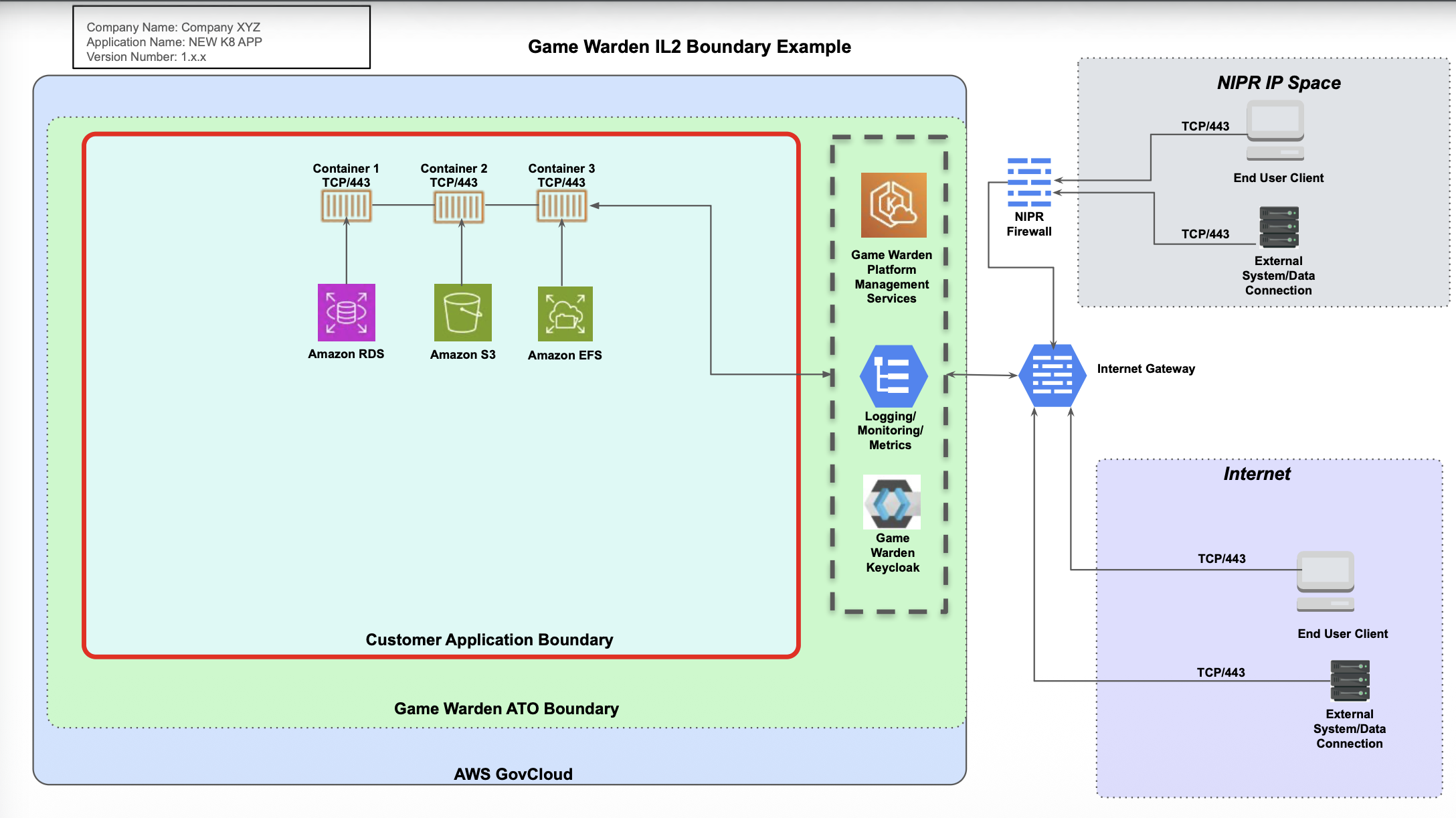
The diagram below displays the external data connections, customer containers, and the required platform services.
The diagram below displays the external data connections, customer containers, and the required platform services.
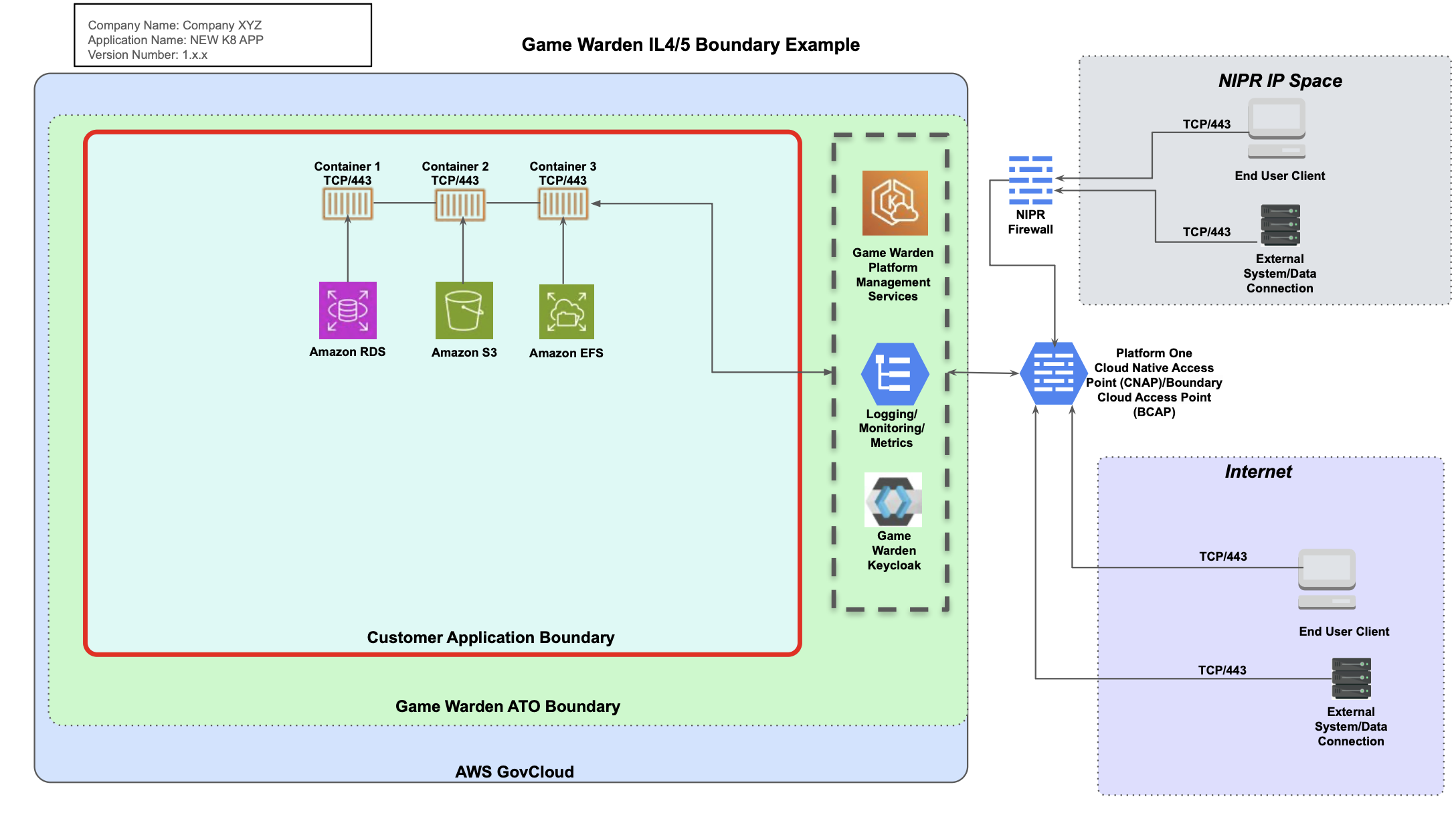
- If your Virtual Desktop Infrastructure (VDI) is on NIPRNet, you can access IL4 and IL5 environments without using Appgate SDP, the DOW-approved authentication service.
- If you are not on NIPRNet or using a NIPRNet-based VPN (such as Air Force Desktop Anywhere), you must use Appgate SDP to access IL4/IL5 applications on
afwerx.dso.mil. This is a DOW P1 team requirement. - For AFWERX customers: Show CNAP in your diagram (base environment: afwerx.dso.mil)
- For DISA customers: Show BCAP in your diagram (base environment: 2F.mil)
Need support with creating your diagram or have questions about your architecture? Reach out to your Mission Success Manager (MSM).