Authorization Boundary Diagram for FedRAMP
Requirements and examples for creating an Authorization Boundary Diagram for FedRAMP in-boundary and out-of-boundary deployments.
An Authorization Boundary Diagram (ABD) is a visual representation of your system's software components, data flows, and security boundaries. It shows how data moves between internal and external systems and identifies the ports and protocols for each connection, and where components locate within the Game Warden environment, ensuring your system connects securely with the platform and satisfies all deployment and security requirements.
As the most critical visual component of the System Security Plan (SSP), the ABD serves as the definitive boundary of what is in scope for the authorization. It defines precisely what is within scope when the Authorizing Official (AO) grants FedRAMP Authorization to your organization.
Understanding data flow and external connections
Your ABD must show how data moves into and out of your system. This enables the Game Warden team to verify your integration and security requirements for deployment.
Include the following three types of data flow in your diagram:
- Ingress: When data enters your system (for example, user input or file uploads).
- Egress: When data exits your system (for example, sending logs or API responses).
- Bidirectional: When data flows both ways (for example, interactions with third-party APIs).
Marking these flows makes it easier for the team to assess how your system interacts with other services. See External Data Connections Overview for security considerations and best practices.
Authorization Boundary Diagram requirements
How you create your ABD depends on your authorization path. Game Warden supports two models:
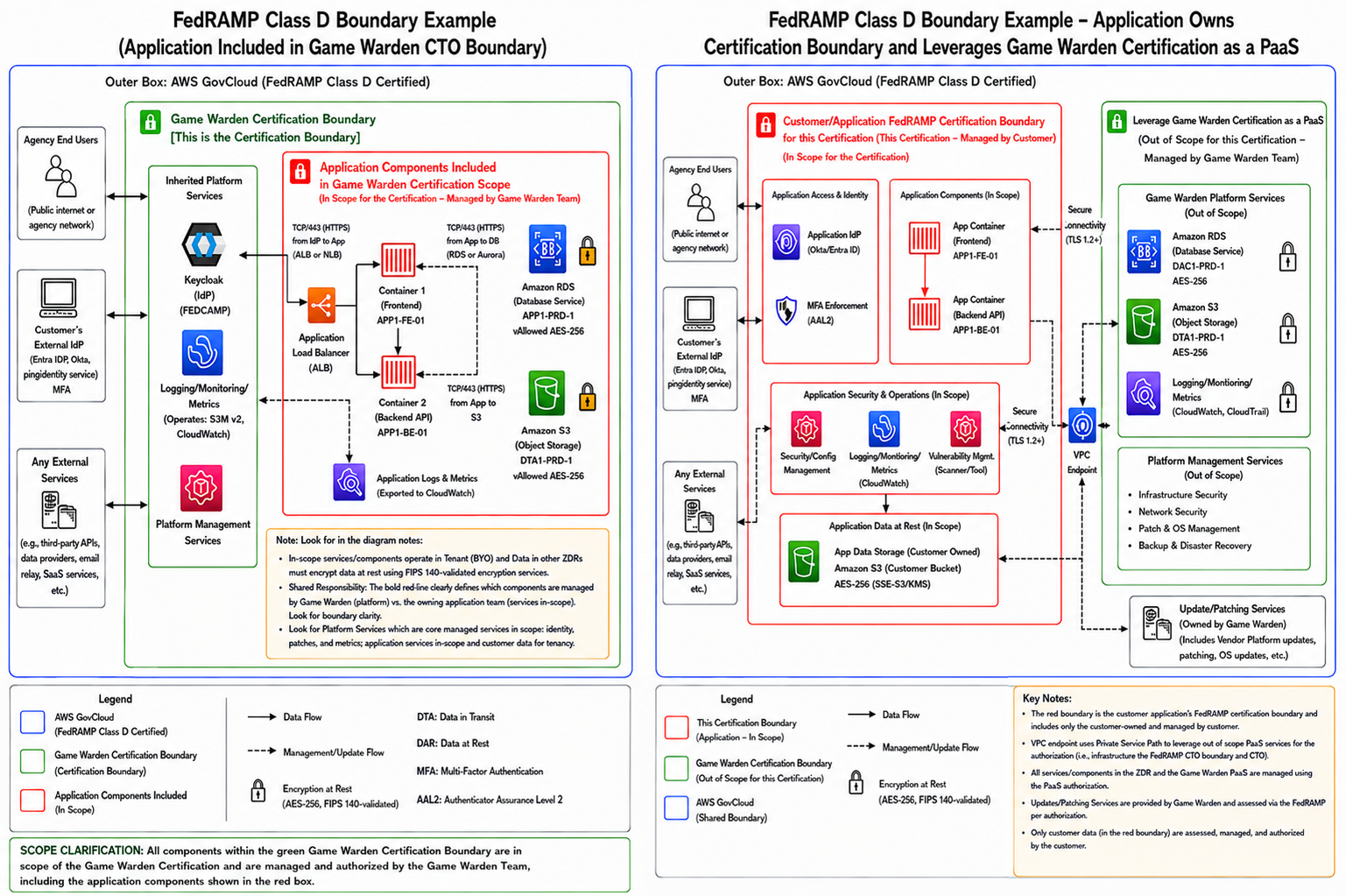
- In-boundary (Accelerated Certification) - Your application deploys within the Game Warden FedRAMP authorization boundary. Game Warden's existing ATO covers your platform and infrastructure layer, and your ABD reflects your application as a component within that boundary.
- Out-of-boundary (Traditional Certification Path) - Your application pursues its own FedRAMP certification through an Agency Sponsor. You maintain ownership of your certification package, and your ABD must depict Game Warden as an external, leveraged service outside your boundary.
The tabs below cover the ABD requirements for each model.
Your FedRAMP submissions must adhere to NIST 800-53 standards and FedRAMP Authorization Boundary Guidance, and must include the following details:
| 1. Boundary and component representation | Your diagram must delineate the shared responsibility model and categorize every component:
|
| 2. Data flow and encryption | Your diagram must show how federal data moves through your system and how it is secured at every stage:
|
| 3. System inventory validation | Your diagram must serve as a visual representation of your written inventory:
|
| 4. Sub-diagrams (if architecture is separated) | If your architecture is complex, you may separate it into multiple diagrams. All sub-diagrams must use consistent naming conventions, color coding, and legends:
|
| 5. The narrative description | Every diagram submitted for FedRAMP must be accompanied by a written narrative that serves as the authoritative explanation of your system. The narrative must align with your diagram and inventory, and must include:
|
Your FedRAMP submissions must adhere to NIST 800-53 standards and FedRAMP Authorization Boundary Guidance, and must include the following details:
| 1. Boundary and component representation | Your diagram must delineate the shared responsibility model and categorize every component:
|
| 2. Data flow and encryption | Your diagram must show how federal data moves through your system and how it is secured at every stage:
|
| 3. System inventory validation | Your diagram must serve as a visual representation of your written inventory:
|
| 4. Sub-diagrams (if architecture is separated) | If your architecture is complex, you may separate it into multiple diagrams. All sub-diagrams must use consistent naming conventions, color coding, and legends:
|
| 5. The narrative description | Every diagram submitted for FedRAMP must be accompanied by a written narrative that serves as the authoritative explanation of your system. The narrative must align with your diagram and inventory, and must include:
|
You must still adhere to standard FedRAMP diagram requirements, such as identifying data flows, FIPS 140-validated encryption, and system inventories, but you must depict Game Warden differently in your diagram than an in-boundary customer would.
When creating your ABD for your own Third-Party Assessment Organization (3PAO) and AO, incorporate the following:
| 1. Game Warden as a leveraged service | Your boundary surrounds your application and organizational components. Depict Game Warden outside your authorization boundary and label it as a Leveraged FedRAMP-Certified Service. Because Game Warden implements the FedRAMP Class D baseline, it can support systems categorized at Class D, Class C, or Class B Certification Classes - document which applies to your system in your SSP. |
| 2. Clear control delineation | Your diagram must visually distinguish the shared responsibility model by separating:
Note: Your 3PAO will focus their assessment on your boundary definition, control allocation, and customer-implemented controls. Second Front's certification already validates the 2F Platform controls. |
Open the ABD template in Excalidraw by selecting Open or dragging the file into the editor. Export the completed ABD as a high-resolution PNG, regardless of certification path, so reviewers can read all text, including IP addresses, ports, and protocols, when zooming in. Select Export image, choose PNG, and set the scale to the largest available option.
Example diagrams
The following examples show how to structure an ABD for each certification path. Use these as a reference when building your own diagram.
Need support with creating your diagram or have questions about your architecture? Reach out to your Mission Success Manager.